
Navigating the Interface
Once you are logged in, you will be directed to the Dashboard, where you can access the main features of lowFAT.
Below are the key areas of the interface.
Top Navigation Menu
The top navigation bar allows you to access all main areas of lowFAT:

- My Profile – view and manage your personal and professional details
- My Dashboard – your main workspace (default view after login)
- Options – contains additional actions:
- Make a Funding Request
- Submit an Expense Claim
- Submit a Blogpost
- Documentation – access the user guide (this documentation)
- Sign out – log out of your account
My Profile
On this page, you will find an overview of your profile, including key details such as:
- Name
- Affiliation
- Research area code
- Fellowship inauguration Year
- Email address
Depending on your profile, additional information may also be displayed, such as links to your website, publications, or professional profiles.
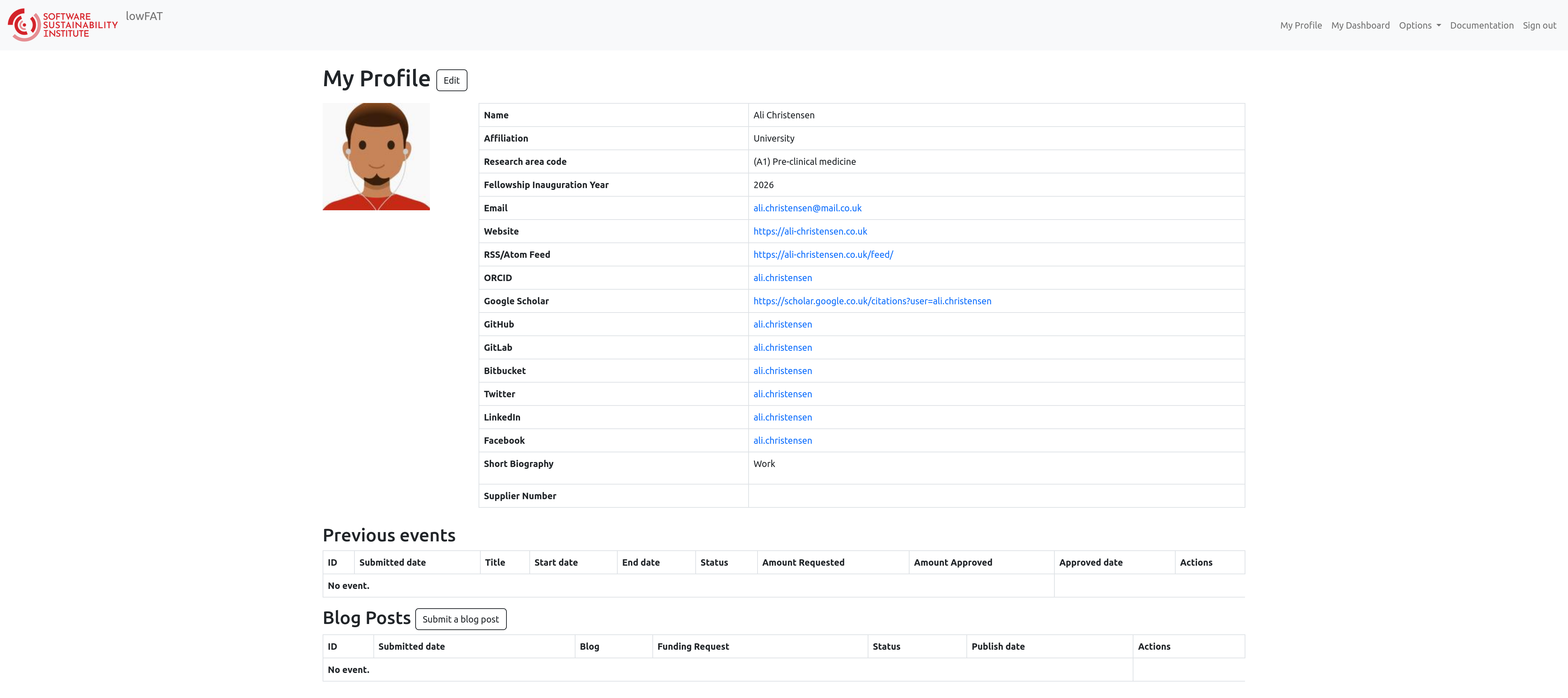
Overall, your profile page provides a comprehensive snapshot of your Fellowship information. You can also view:
- A record of past events you have attended or organised
- Any blog posts you have published as part of your Fellowship activities
These help you track your engagement within the Fellowship Programme and are also displayed on the public-facing side of the lowFAT website, showcasing your involvement to a wider audience.
Edit My Profile
If you would like to update or modify your profile information, click the “Edit” button located next to “My Profile.”
This will take you to a dedicated page where you can review and update the following sections.
Personal Details
Update:
- Name
- Contact information
- City and country of residence
- Other personal information
You can also upload or update photos that appear on the website.
We encourage you to keep your details up to date. Whenever you update your profile, we receive a notification and will ensure the SSI website is updated accordingly.
Professional Details
Provide or edit information about:
- Career stage
- Job title
- Research area and classification
- Affiliation
- Other professional details
Please keep this information up to date, as it may be used for:
- Reporting
- Mentor–mentee matching
- Collaboration opportunities
Information for the Website
Update the information you would like displayed on the public-facing side of lowFAT. Your listed interests are used as “areas of expertise” on the SSI website. Please use clear and specific keywords.
Social Networks
Add or update links to your professional social media accounts or online profiles.
You are welcome to share only the websites, blogs, and social media accounts you feel comfortable displaying.
If you would like to include additional links or information, you can mention them in your “short biography”. This can be up to 300 words and will also be displayed on the SSI website.
When you update your profile on lowFAT, the Fellowship Programme Team will receive a notification. We will update the website accordingly as soon as possible.
Supplier Number
This is a unique identifier used for administrative and financial purposes, such as processing payments. It is issued by the University Finance Department.
- This number will be issued after your first claim has been submitted.
- It will be added to lowFAT by SSI Finance.
- Please insert this number on all future expense claim forms.
For any questions or comments, please email:
fellows-management@software.ac.uk