
My Dashboard
The Dashboard is the default page you see when you log in. It provides an overview of your Fellowship activity in one place, including your funding requests, expenses, and blog posts.
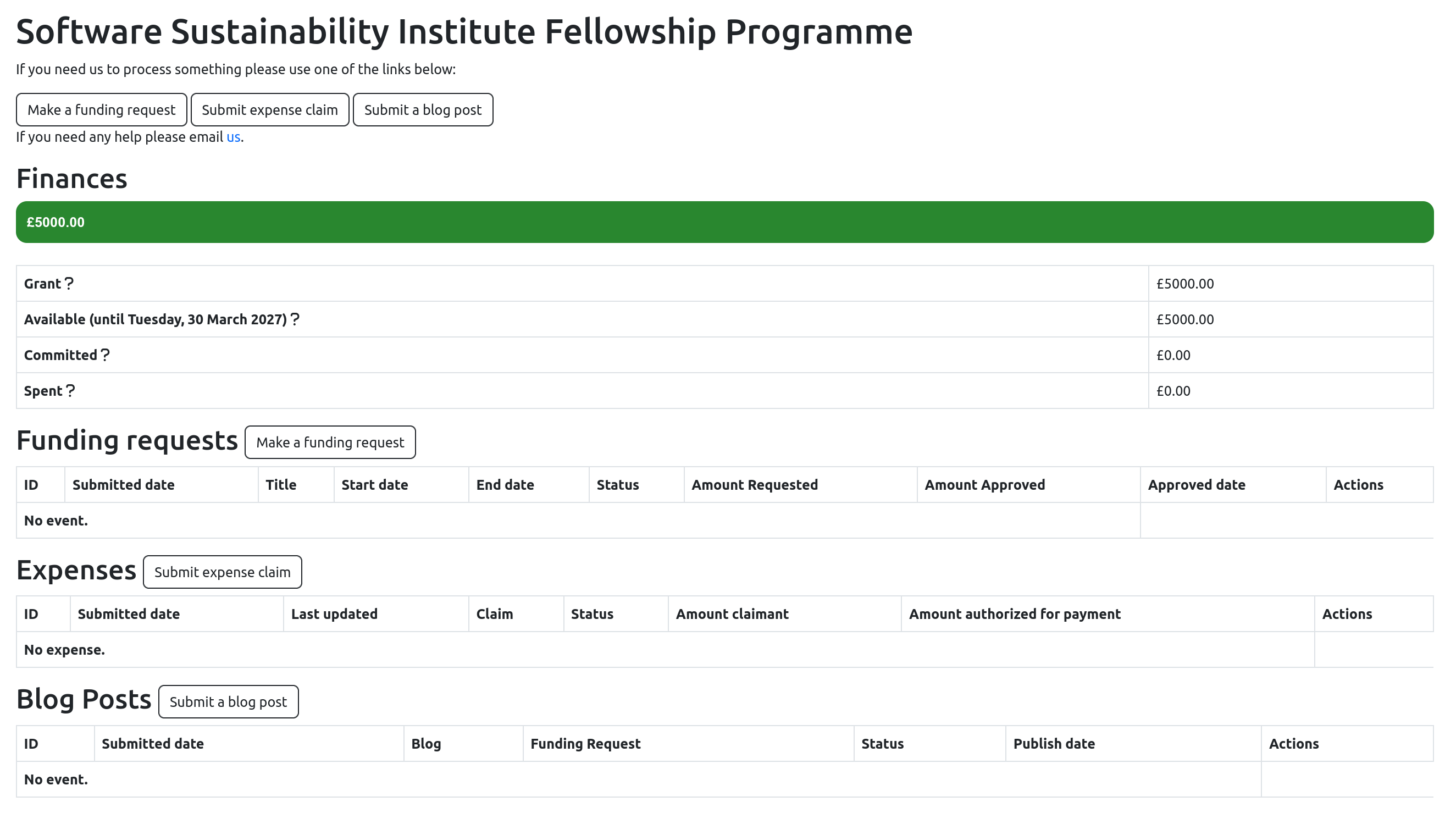
The page is divided into four sections:
- Finances – a summary of your available, committed, spent, and passed funding
- Funding Requests – track and manage funding requests you have submitted or that are in progress
- Expenses – review and track any expenses you’ve claimed
- Blog Posts – access a list of blog posts you’ve published or are working on
The tables in the Funding Requests, Expenses, and Blog Posts sections are colour-coded to help you quickly identify the status of items at a glance.
Finances
This section shows how your Fellowship funding is allocated and helps you understand how much funding remains available.
Definitions
- Grant – the total amount awarded to you as part of your Fellowship
- Available – funding that has not yet been committed or spent
- Committed – funding that has been approved but not yet spent (i.e. not yet claimed through expenses)
- Spent – the total amount of approved expense claims
During your inaugural year:
Available + Committed + Spent = Total Grant
Once all expense claims for a specific activity have been processed, any difference between the Committed and Spent amounts will be returned to the Available balance.
After your inaugural year:
- Available will be set to £0
- You can still submit funding requests to the Further Development Fund
Certain funding requests and expenses (such as in-person events like the Collaborations Workshop) are covered separately by the Institute and are not included in the calculations for Available, Committed, or Spent.
Understanding the finance bar
The finance summary uses colour to show how your funds are distributed:
Green – Available
Orange – Committed
Red – Spent
Black – Passed
This provides a quick visual overview of how your funding is currently allocated.
Funding Requests
This section allows you to track and manage your funding requests.
The table provides an overview of each request, including:
- Unique ID
- Submission date
- Title
- Start and end dates
- Status
- Requested amount
- Approved amount and approval date (if applicable)
- Available actions
If no funding requests have been submitted, the table will display “No event.”
Statuses
- Unprocessed – submitted but not yet reviewed
- Processing – currently under review
- Approved – reviewed and approved to proceed
- Archived – completed and stored for record-keeping purposes
- Cancelled – cancelled by the submitter or reviewer before completion
- Rejected – reviewed and declined. No further action required
- Removed – removed from the workflow
Important Notes
- For funding requests, Archived means that all related expense claims have been submitted and approved.
- It does not mean that payment has been made.
- Payments are typically processed within a few weeks after expense claims are approved.
- Payments are tracked separately from lowFAT by the Finance and Fellowship Programme Team.
Expenses
This section allows you to track and manage your expense claims.
The table provides:
- Claim details
- Status
- Amount claimed
- Amount authorised for payment
- Available actions
You may be contacted by the Finance team regarding your expense claim. These email communications (and your responses) will be logged in lowFAT.
Statuses
- Submitted – awaiting review
- Returned to claimant for Review/Action – requires additional clarification, documentation, or receipts
- Processing – under review by the Finance team
- Pending for approval – completed and sent to the SSI Directorate for internal approval
- Approved – approved and sent to the University of Edinburgh central finance team for payment
- Waiting for Blog Post – a blog post must be submitted before the claim can be processed
- Rejected – the claim has been rejected.
- Cancelled – the claim has been cancelled by the reviewer or Fellow
- Removed – removed from the workflow
Blog Posts
This section allows you to track and manage your blog posts.
The table provides:
- Submission details
- Status
- Publish date (if published)
- Available actions
Types of Status
- Waiting for triage – awaiting assignment to a reviewer or editor
- Waiting to be reviewed – awaiting review by the assigned reviewer or editor
- Reviewing loop – under review with possible revisions
- Waiting to be proofread – ready for proofreading before publication
- Waiting to be published – ready for publication
- Published – successfully published
- Cancelled – cancelled by the Fellow or reviewer (e.g. content is out of date).