
Submit an Expense Claim
Submitting an expense claim in lowFAT involves completing a form and uploading the required documentation.
This guide walks you through the process step by step.
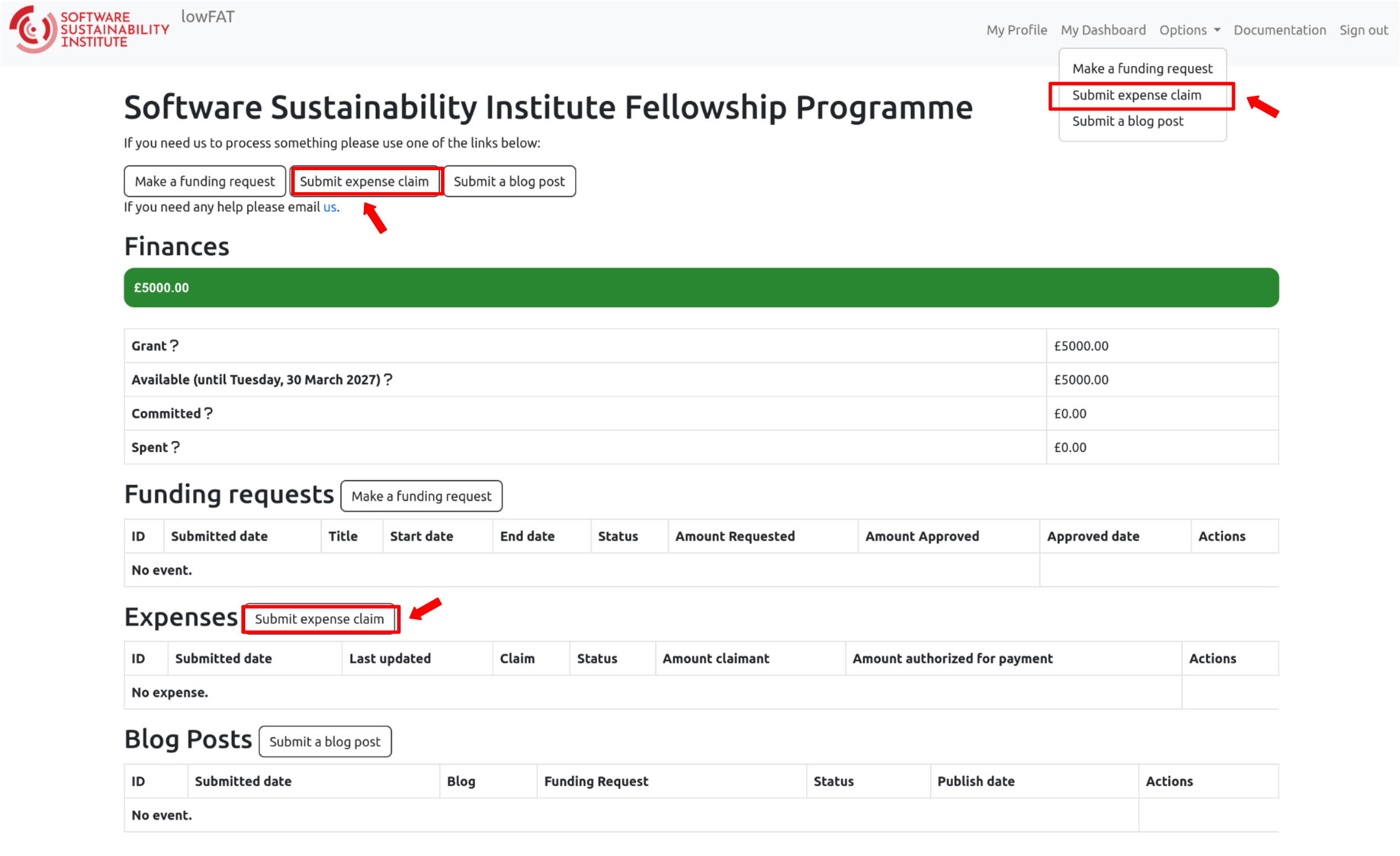
Accessing the Expense Claim Form
You can submit an expense claim in any of the following ways:
- Click “Options” in the top navigation menu and select “Submit expense claim”
- Click the “Submit expense claim” button on the dashboard
- Click the same button within the “Expenses” section
Before You Start
Expense claims must follow the relevant guidance and policies:
- The Guidelines for Reimbursement of Expenses by the SSI
- The Fellowship Programme Terms and Conditions for your cohort
- The University of Edinburgh (UoE) Finance Expenses Policy (linked from the guidelines page)
Preparing a Claim
Before filling in the form, make sure you have:
- An approved funding request
- A completed UoE Payment of Non-Staff Expenses Form (Sections 1–5) (available on the SSI website)
- A single PDF containing all receipts and proof of payment
- Any required bank/card statement extracts
- Your Supplier Number (available in your profile)
The University of Edinburgh updates the forms regularly (sometimes without notice). Therefore, always download a fresh copy from the official website each time you submit a claim.
Additional guidance:
- SSI Fellows must submit expense claims via lowFAT
- If you supported someone else using your Fellowship funds, they should email their claim directly to the Finance Team
- Paper receipts should be scanned and included
- Store original paper receipts safely for audit purposes
- Native digital receipts do not require paper copies
- Group all expenses relating to one event into a single submission where possible
- All expense claims linked to a funding request must be submitted by the Fellow via lowFAT
Completing the Expense Claim Form
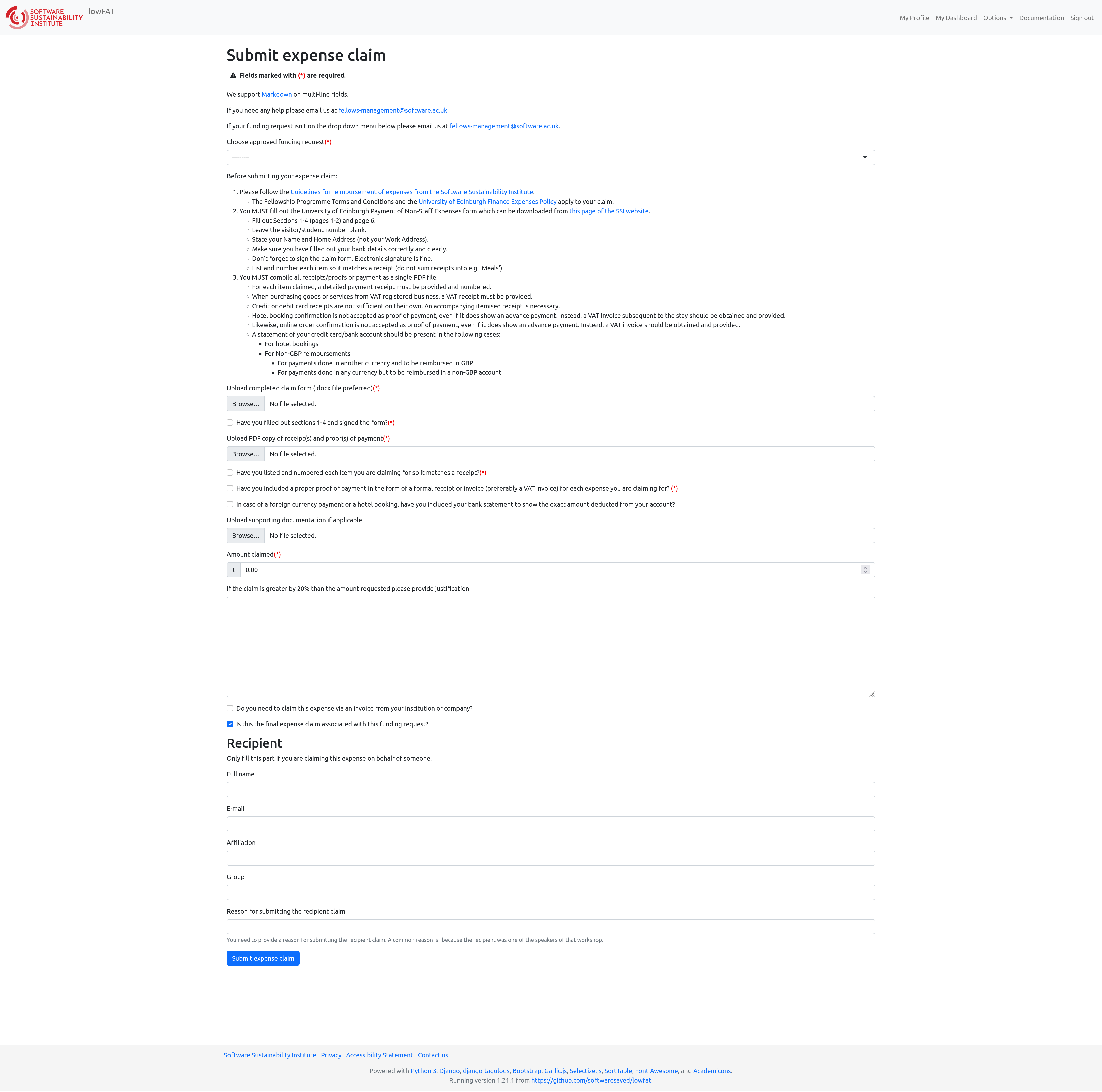
Once the form is open, complete the following sections:
Choose an approved funding request
Select your approved funding request from the dropdown.
If it is not listed, contact:
fellows-management@software.ac.uk
Upload your completed form
- Upload the completed UoE Expense Claim Form (Sections 1–5)
- Ensure Section 4 is fully completed
- Tick “receipt attached” for each item
- Expenses without receipts will not be reimbursed
- Keep the file in Word format (.doc/.docx)
Upload receipts and proof of payment
- Upload a single PDF file containing:
- All receipts
- Proof of payment
- Number each receipt to match Section 4
- Include VAT invoices where applicable
- Include bank statements where required.
Confirm required checks
You will be asked to confirm that:
- Receipts are numbered correctly
- Proof of payment is included
- Bank/card statements are provided where required
Upload supporting documentation (if applicable)
You may upload additional supporting documents where relevant, such as:
- Travel confirmations
- Booking details
- Supporting correspondence
- Any documents that help clarify your claim
This step is optional but recommended where additional context may be helpful.
Enter amount claimed
- Enter the total amount in GBP
- If the claim exceeds the approved amount by more than 20%, provide justification
Tick the following relevant options:
- Indicate if claiming via an institutional/company invoice
- Confirm if this is your final expense claim linked to the funding request
Recipient (if claiming for someone else)
Only complete this section if claiming on behalf of another person.
General Rules
- Be clear and tidy in your submission
- Only actual incurred costs, supported by proof of payment, can be reimbursed
- A receipt or invoice for every expense claimed is compulsory
- Always state the correct currency in which you wish to be paid
Proof of Payment Requirements
For each item claimed:
- A detailed receipt or VAT invoice must be provided
- For VAT-registered businesses, a VAT receipt is required
- Card slips alone are not sufficient
- Booking confirmations are not accepted as proof of payment
- A VAT invoice must be obtained after the stay
- Online order confirmations are not sufficient
- A VAT invoice must be obtained
Bank/Card statements must be provided for:
- Foreign currency payments
- Accommodation bookings
- Conference tickets
- International flights
- Part payments from a group bill (e.g. shared meals)
All receipts and proof of payment must be compiled into a single PDF document.
Examples of Acceptable Expenditure
Reasonable expenses incurred in support of SSI Fellowship activities can be reimbursed, subject to policy.
Travel
- Travel should normally be by the cheapest reasonable means
- Business or first-class travel is not permitted
- Internal UK flights are not permitted under the UoE Sustainable Travel Policy
- Taxis are permitted where appropriate
- AirBnB is allowed but may be subject to restrictions
- Travel insurance cannot be booked on your behalf
In some cases, SSI can arrange travel in advance (e.g. long-haul flights). This is handled outside the standard expense claim process and there are administrative limitations. To discuss options, contact: fellows-management@software.ac.uk
Other Rules
- Alcohol will not be reimbursed
- Equipment and subscriptions supporting online activities are allowed
- This excludes computers, laptops, tablets, monitors, or printers
- Avoid paying in cash where possible — and always obtain a receipt if you do
Common Scenarios
Shared expenses
- Provide the full receipt
- Clearly mark the items you are claiming
- Provide matching proof of payment
Tipping
- Must be reflected in the payment record
- Must not exceed 10% of the claimed amount
Alcohol
- Must be clearly marked so it can be excluded
If accommodation or registration covers multiple people, a bank statement is required.
Foreign Currency
- Avoid paying in cash
- Prefer card or bank transfer
- Provide both:
- Detailed receipt
- Bank/card statement showing currency conversion
If no GBP value appears on your statement, indicate the foreign currency and follow Section 4 instructions in the claim form
Completing the University of Edinburgh Expense Form
If your UK university is claiming directly from SSI:
- Do not use this form.
- Contact SSI Finance.
- Payment will be made via Purchase Order and invoice.
- Setup may take up to two months.
- Work cannot begin before a Purchase Order is issued.
For all other claimants, please complete Sections 1–5 of the form:
Section 1
- Insert your Supplier Number (found in your lowFAT Profile)
- Issued after your first claim
- Insert your Name and Home Address (not work address)
- Ensure bank details are correct
Section 3
Under “For the purpose of” insert:
lowFAT ID – Your Name – Reason for claim
Example:777 J Smith – Travel to London for RSECon
Section 5
- Insert your name
- Insert the submission date
File Naming
Save the form as:
lowFAT ID – Initial Family Name
Example:777 J Smith
- Keep the file in MS Word format.
- Do not change the file format.
Invoicing the SSI
If you are being paid directly for a service (e.g. honorarium):
You must:
- Agree the amount in advance.
- Be set up as a supplier in the University finance system.
- Provide a quote.
- Have a Purchase Order created.
- Submit an invoice.
You cannot begin work until you receive confirmation from SSI Finance.