
Example Code
Last updated on 2026-06-19 | Edit this page
Overview
Questions
- What example code will we use for the lesson?
- How do we set up the Python package prerequisites to run the code?
Objectives
- Obtain the example code used for this lesson
- Create a virtual environment to hold the Python packages needed to run the code
- Open and run the example code within VSCode
Obtaining Example Code
For this lesson we’ll be using some example code available on GitHub, which we’ll clone onto our machines using the Bash shell. So firstly open a Bash shell (via Git Bash in Windows or Terminal on a Mac). Then, on the command line, navigate to where you’d like the example code to reside, and use Git to clone it. For example, to clone the repository in our home directory, and change our directory to the repository contents:
Setting up a Virtual Environment
The existing code needs the NumPy and Matplotlib packages in order to run. Let’s now create a Python virtual environment and install them. Make sure you’re in the root directory of the repository, then type
Once created, we can activate it so it’s the one in use:
BASH
[Linux] source venv/bin/activate
[Mac] source venv/bin/activate
[Windows] source venv/Scripts/activate
Once activated, install the needed packages:
Examining the Repository
Next, let’s take a look at the contents of the repository by opening the repository directory within VSCode. After starting VSCode, you can do this in a couple of ways, either:
- Select the
Source controlicon from the middle of the icons on the left navigation bar. You should see anOpen Folderoption, so select that. - Select the
Fileoption from the top menu bar, and selectOpen Folder....
In either case, you should then be able to use the file browser to
locate the directory with the files you just extracted, and then select
Open. Note that we’re looking for the folder that
contains the files, not a specific file.
You may be presented with a window asking whether you trust the authors of this code. In general, it’s a good idea to be at least a little wary, since you’re obtaining code from the internet, so be sure to check your sources!
We also need to configure the Python extension within this workspace to use the Python contained with the virtual environment we created earlier. VSCode has a sophisticated method to access it’s inner functionality known as the Command Palette, which we’ll use to address this.
- Select
ViewandCommand Palettefrom the VSCode menu - Begin typing
Python: Select Interpreter, and then select it when it appears - A list of available Python installations should appear. Look for and
select the one that says
./venv/bin/python(our virtual environment)
Once selected, the default Python interpreter for VSCode will be configured.
So far within VSCode we have downloaded some code from a repository and opened a folder. Whenever we open a folder in VSCode, this is referred to as a “Workspace” - essentially, a collection of a project’s files and directories. So within this workspace, you’ll see the following:
-
data/- a directory containing some example CSV files, each representing inflammation data from a series of hypothetical clinical trials for 60 patients over 40 days -
.gitignore- a text file that contains things that shouldn’t be tracked by Git version control -
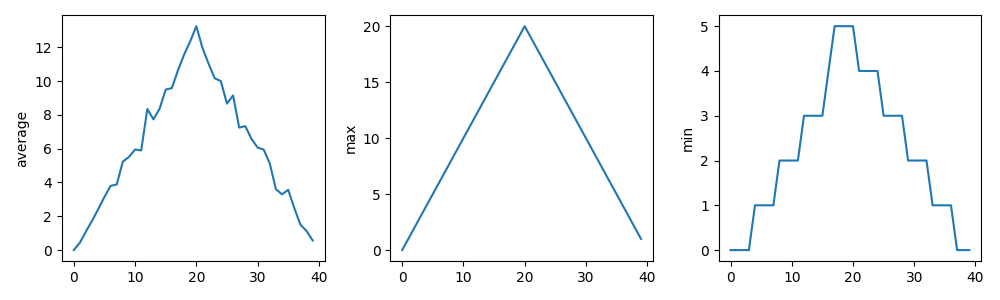
inflammation-plot.py- which plots three graphs of the mean, maximum, and minimum values for each day of a trial for all patients
You’ll also see venv/ which is not part of the
repository, but the virtual environment we created and configured
earlier.
Examining the Code
Select the inflammation-plot.py file in the explorer
window, which will bring up the contents of the file in the code
editor.
PYTHON
import glob

import numpy as np
from matplotlib import pyplot as plt

filenames = glob.glob('data/inflammation-*.csv')
filenames.sort()

for filename in filenames:
    print(filename)

    data = np.loadtxt(fname=filename, delimiter=',')

    fig = plt.figure(figsize=(10.0, 3.0))

    axes1 = fig.add_subplot(1, 3, 1)
    axes2 = fig.add_subplot(1, 3, 2)
    axes3 = fig.add_subplot(1, 3, 3)

    axes1.set_ylabel('average')
    axes1.plot(data.mean(axis=0))

    axes2.set_ylabel('max')
    axes2.plot(data.max(axis=0))

    axes3.set_ylabel('min')
    axes3.plot(data.min(axis=0))

    fig.tight_layout()
    fig.savefig(filename + '.png')
The aim will be to use GitHub Copilot within VSCode to improve this script throughout the session.
Note that as an example, the code is deliberately written to have flaws. Things like the line spacing is inconsistent, there are no code comments, there’s some code duplication, and you may spot other issues too. It’s also deliberately been kept relatively simple. This is for two reasons:
- Most importantly, from a training perspective, when we use Copilot later to suggest changes, we’ll be able to quickly reason about the changes and how they impact the codebase
- To give us enough scope to improve it
But in essence, the code is designed to do the following:
- Loop through a list of all inflammation data files (sorted by their
filename) in the
data/subdirectory - For each file, load the data into a Numpy array
- For that array, create a plot containing three graphs, one for each of the mean, minimum and maximum of the data
- Save the plot image to a file (essentially the same path and
filename, with a
.pngadded to it)
Running the Example Code
Next, you may recall we needed NumPy and Matplotlib to run this code;
if you look at the the bottom right of VSCode’s status bar, it should
mention the version of Python being used,
e.g. 3.14.2 (venv). So here, we can see that VSCode has
picked up our virtual environment we configured earlier and will use
that by default.
Then, select the “Play”-looking icon at the top right of the code editor.
You should see the program run in a terminal window that appears at the bottom, along with the following output from the program:
OUTPUT
data/inflammation-01.csv
data/inflammation-02.csv
data/inflammation-03.csv
data/inflammation-04.csv
data/inflammation-05.csv
data/inflammation-06.csv
data/inflammation-07.csv
data/inflammation-08.csv
data/inflammation-09.csv
data/inflammation-10.csv
data/inflammation-11.csv
data/inflammation-12.csv
After it’s completed, we should see corresponding plot image files in
the data directory, essentially each with a .png on the
end. For example, inflammation-01.csv.png looks like:
Error:
the term conda is not recognised
If you’re running an Anaconda distribution of Python on Windows, if you see this error it means that VSCode is not looking in the right place for Anaconda’s installation. In this case, you may need to configure VSCode accordingly:
- Activate the Command Palette, either by selecting
ViewandCommand Palettein the menu, or by pressingCtrl+Shift+P(Linux),Mac/Windows Key+Shift+P(Mac/Windows) simultaneously - Type
Terminal: Select Default Profile - From the options, select the entry that’s something like
Command Prompt C:\WINDOWS\...
Hopefully that should resolve the issue.
What Does the Patient Inflammation Data Contain?
Each dataset file in data/ records inflammation
measurements from a separate clinical trial of the drug, and each
dataset contains information for 60 patients, who had their inflammation
levels recorded (in some arbitrary units of inflammation measurement)
for 40 days whilst participating in the trial.
These datasets are reused from the Software Carpentry Python novice lesson.
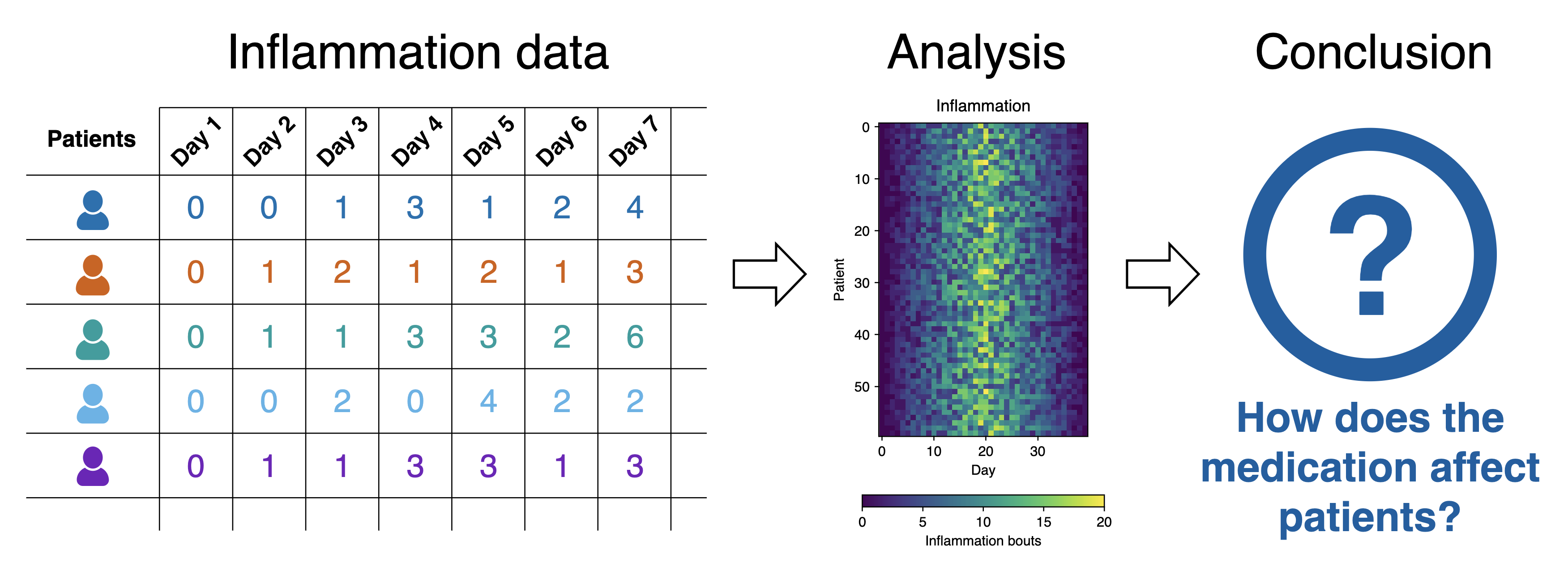
Each of the data files uses the popular comma-separated (CSV) format to represent the data, where:
- each row holds inflammation measurements for a single patient
- each column represents a successive day in the trial
- each cell represents an inflammation reading on a given day for a patient
- The example Python code generates a basic set of statistical plots
for all data files within the
data/directory. - The code has a number of deliberate issues that we want to resolve throughout this lesson using GitHub Copilot.